Enter a query to search our site. Note that you can use "*" and "?" as wildcards. Enclosing more than one word in double quotes ("CSS Layout") will search for the exact phrase.

Project Seven dot com

Menu Bar Magic: Automated CSS Menus

Buy Now [$60] | Live Examples

Buy Now and Download Immediately

Create and Manage single-level Horizontal and Vertical CSS Menus—Instantly!

Menu Bar Magic automates the process of building single level CSS-based navigation bars. You can add as many menus to the same page as you like, in both horizontal and vertical orientations. Each Menu Bar can be styled independently or you can have some, or even all, share the same style. The options for each Menu bar are set independently, each with its own dedicated user interface.

PVII Menu Bar Magic Main Features:

  • An automated interface in which to create, configure, and manage your menus.
  • Add as many menus as you want to your page. Use them for main navigation, secondary navigation, or for spot effect.
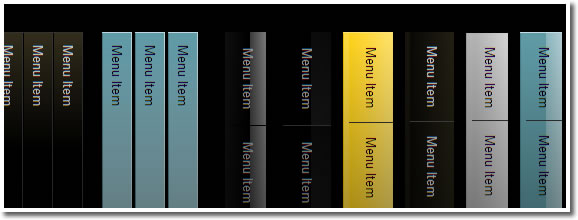
  • 9 CSS Style Themes to choose from.
  • Automatic current page link highlighting.
  • Optional Advanced Current Page Link Highlighting.
  • Full support for Dreamweaver Template pages.
  • Link Animation can be turned on or off separately for each menu on your page.
  • Optional Down-State toggle on click.
  • Special classes automatically assigned to first and last links and list items for advanced custom styling flexibility.
  • A handy Remove Menu command.
  • Robust and efficient cross-browser support.
  • Accessible and 100% search engine friendly.
  • Editable Fireworks images.
  • PDF User Guide.
  • Free Technical Support.

The Interface

The Menu Bar Magic user interface is accessible from the Insert or Modify menus inside Dreamweaver, or via an icon on the Insert Bar, and fully automates the menu-creation and management processes. Click the special Menu Bar Magic link below to see a full shot of the user interface.


Add your menu items, assign links, set your options and style theme, then just click OK!

Menu Bar Magic Style Theme Example Pages

Menu Bar Magic comes with 9 CSS Style Themes. Each Style Theme has both vertical and horizontal versions. See the examples now...

Requirements

  • Dreamweaver MX, MX 2004, CS3, CS4, CS5 and higher
  • Fireworks MX or higher is recommended for easy background image editing

Browser Support

Menu Bar Magic supports major browsers, including:

  • Firefox 2.0x and higher
  • Internet Explorer 5.x, 6.x, 7.x and higher
  • Opera 9.x and higher
  • Safari 2.x and higher

Other browsers based on the rendering engines of the above browsers, such as Google Chrome, are also supported. Legacy browsers are supported to the degree that all links are always accessible, while some of the background effects will not function as well as in modern browsers.